NFC Component
0. SDK Mobile Base Requirements
SDK Mobile is a set of libraries (Components) that offer a series of functionalities and services, allowing their integration into a Mobile application in a simple and fully scalable way. Certain components must be installed depending on the use case required. Its high level of modularity allows other new components to be added in the future without affecting those already integrated into the project.
For more information on the base configuration, go to the Getting Started section.
1. Introduction
The Component discussed in the current document is called NFC Component. It is responsible for NFC reading of ID cards and passports. Its main functionalities are the following:
-
Internal management of the NFC sensor.
-
Permission management.
-
Document analysis.
-
Progress analysis.
-
Assistant in reading processes.
-
Return all possible information to be read
-
Return of images when they are available for reading.
1.1 Minimum requirements
The minimum iOS SDK version required is as follows:
-
Minimum iOS version: 13
-
Minimum device: iPhone 6s - the first to have an NFC reader
2. Integration of the component
⚠️ Before integrating this component, it is recommended to read the documentation related to Initial Integration and follow the instructions given in that document.
This section will explain step by step how to integrate the current component into an existing project.
2.1. Dependencies required for integration
To avoid conflicts and compatibility problems, if you want to install the component in a project containing an old Facephi libraries (Widgets) version, these must be removed entirely before installing the SDKMobile components.
- Currently FacePhi libraries are distributed remotely through different dependency managers, in this case Cocoapods. The mandatory dependencies that must have been previously installed (adding them to the project's Podfile file) are:
Cocoapods
The mandatory dependencies that must have been previously installed (adding them to the project's Podfile file) are:
pod 'FPHISDKMainComponent', '~> 2.6.0'
To install the NFC component, the following entry must be included in the application's Podfile:
pod 'FPHISDKNFCComponent', '~> 2.14.0'
SPM
The mandatory dependencies that must have been previously installed are:
//HTTPS
https://github.com/facephi-clienters/SDK-SdkPackage-SPM.git
//SSH
git@github.com:facephi-clienters/SDK-SdkPackage-SPM.git
To install the NFC component, it must be included in the project modules:
//HTTPS
https://github.com/facephi-clienters/SDK-NFC_component-SPM.git
//SSH
git@github.com:facephi-clienters/SDK-NFC_component-SPM.git
Once the dependencies are installed, you can use the different functionalities of the component.
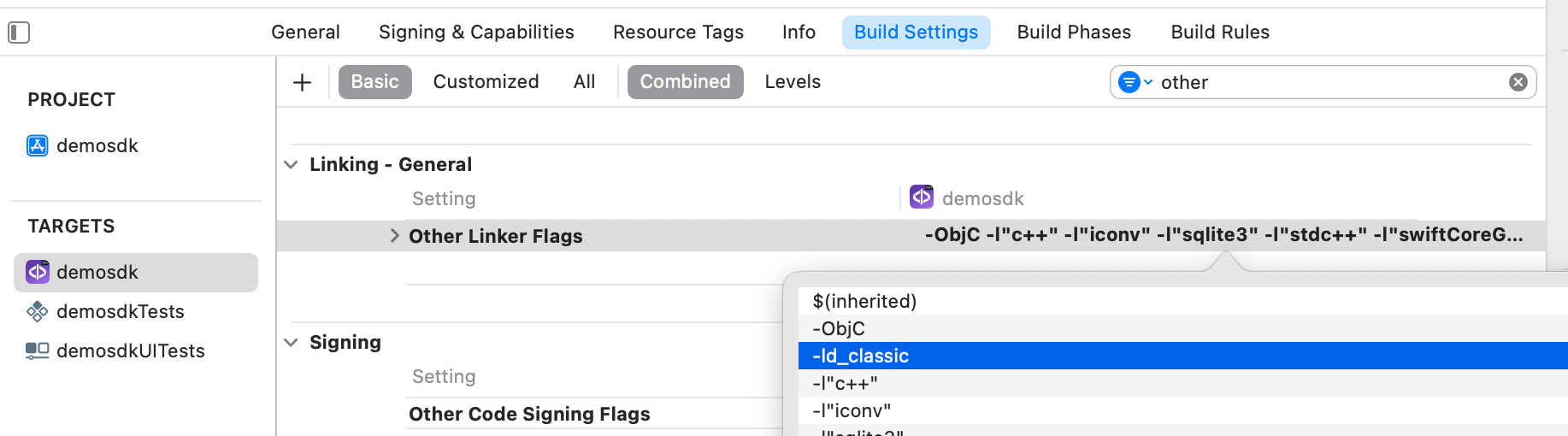
- If developing with XCode15, a post-installation script must be included:
2.2 Permissions and settings
In the client application where the components are going to be integrated, it is necessary to incorporate the following elements in the Info.plist file:
It is necessary to allow the use of NFC - (Privacy - NFC Scan Usage Description)
Indicate NFC identifiers - (ISO7816 application identifiers for NFC Tag Reader Session)
A0000002471001
A0000002472001
00000000000000
It is necessary to add the Near Field Communication Tag Reading option in the Signing & Capabilities section of the target
3. Start a new operation
In order to generate the associated information correctly in the platform, the newOperation command must be executed first.
ℹ️ This command must have been executed before launch.
To learn more about how to start a new operation, it is recommended to consult the Start a new operation documentation, which details and explains what this process consists of.
4. Available drivers
| Controller | Description |
|---|---|
| NFCController | NFC reading main controller |
5. Component configuration
Once initialized, a NFCConfigurationData object must be created and passed as a parameter to the SDKController during component launch to configure the current component.
The following section will show the fields part of this class and what each is used for.
5.1. Class NFCConfigurationData
5.1.1. Basic Documentation
showTutorial
Indicates if the component activates the tutorial screen. This view explains intuitively how the capture is performed.
vibrationEnabled
iOS does not allow vibration to be added while taking NFC readings.
showDiagnostic
If set to true, if an error or lack of permissions occurs, the sdk will display a screen with the error returned by the widget.
extractionTimeout
Sets the maximum time the readout can be performed. This affects the time the app will wait from the moment the NFC's reading modal appears until it stops. NOTE: There is also an internal timeout in iOS15 and inferior. If a tag is detected, the reading must be done before 20 seconds have passed. This value can't be changed as it's forced by the SO.
5.1.2 MRZ Key parameters
If one of this parameters' value is not correct, the authentication step of the communication process with the chip will fail with ErrorType.OTHER(NfcError.NFC_INVALID_MRZ_KEY.rawValue).
documentNumber
Indicates the document number or media number depending on the document to be read.
This field is mandatory.
birthDate
Indicates the date of birth appearing in the document ("dd/MM/yyyy").
This field is mandatory.
expirationDate
Indicates the expiry date as it appears in the document ("dd/MM/yyyy").
This field is mandatory.
5.1.3. Advanced Documentation
enableDebugMode
Enable debug mode for the component.
skipPace
Indicates that only NFC BAC reading is desired. This is a simpler and faster communication protocol that allows reading a wider variety of documents.
onlyPace
Indicates that only NFC Chips that support PACE are desired. This is a more secure and modern communication protocol that adds a layer of security. Only available from >=iOS16. Needs PACE string in the entitlement's file of the app.
5.1.4 Other parameters
issuer
Indicates the country of origin of the document to be read.
documentType
Indicates the type of document to be read: - ID_CARD - PASSPORT - FOREIGN_CARD
readableTags
An array that indicates which data group's should be read (i.e. if the face is not needed, you can skip DG2 in the array and the reading process will be a lot quicker). Its value is null by default, in this case, it will try to read every DG (while skipping the signature or image if configured as false extractSignatureImage and extractFacialImage).
readingProgressStyle
This enum changes how the progress is shown in the nfc capture modal. Available options are DOTS (default) and PERCENTAGE.
tagSessionTimeout
The reading process is made with small data transfers between the device and the NFC chip. This comunication usually takes ~100ms, but there have been reports of "hangs". This parameter sets a timeout to avoid them. Default value is 1500ms, and if nil, there is no timeout.
activeAuthenticationChallenge
This parameter allows to inject a custom challenge that can be checked later to guard of Replay Attacks.
tagConnectionLostTimer
Before we had a single timer that spanned more than one request if the response was big.
extractFacialImage
Default is true. If false, the reading process will skip DG2 which contains the facial image.
extractSignatureImage
Default is false. If false, the reading process will skip DG7 which contains the signature image.
6. Component use
Once the component has been started and a new operation has been created (Section 3), the SDK components can be launched. There are two ways to launch the component:
- [WITH TRACKING] This call allows to launch the functionality of the component, but internal events will be tracked to the tracking server:
let controller = NFCController(data: nfcConfigurationData, output: { sdkResult in
        // Do whatever with the result
        ...
    }, viewController: viewController)
SDKController.shared.launch(controller: controller)
- [WITHOUT TRACKING] This call allows to launch the functionality of the component, but no event will be tracked to the tracking server:
let controller = NFCController(data: nfcConfigurationData, output: { sdkResult in
        // Do whatever with the result
        ...
    }, viewController: viewController)
NFCController.shared.launchMethod(controller: controller)
The launch method must be used by default. This method allows tracking to be used if your component is enabled and will not be used when it is disabled (or the component is not installed).
On the other hand, the launchMethod method covers a particular case in which the integrator has tracking installed and activated but, in a certain flow within the application does not want to track information. In this case, this method is used to prevent this information from being sent to the platform.
7. Receipt of the result
The controllers will return the required information in SdkResult format. More details in the Result Return section.
7.1. Error's management
On the error side, internally we have the NfcError class. This enumeration contains many specific errors that do not provide useful information if returned to the integrator, so they are transformed to a simpler type (ErrorType):
public enum ErrorType: Equatable, Error {
    //COMMON - BASIC
    case NO_ERROR
    case UNKNOWN_ERROR
    case OTHER(String)

    //COMMON - REQUIREMENTS
    case NO_DATA_ERROR
    case NO_OPERATION_CREATED_ERROR
    case NETWORK_CONNECTION

    //COMMON - PERMISSIONS
    case CAMERA_PERMISSION_DENIED
    case MIC_PERMISSION_DENIED
    case LOCATION_PERMISSION_DENIED
    case STORAGE_PERMISSION_DENIED

    //COMMON - USER'S INTERACTION
    case CANCEL_BY_USER
    case SDK_TIMEOUT

    //COMMON - LICENSE ERROR
    case LICENSE_CHECKER_ERROR(String)
    case MISSING_COMPONENT_LICENSE_DATA
    case COMPONENT_LICENSE_ERROR
    case EMPTY_LICENSE
}
The OTHER case can contain these String values:
public enum NfcError: String {
    case NFC_INVALID_MRZ_KEY
    case NFC_NOT_SUPPORTED
    case TAG_CONNECTION_LOST
    case SECURITY_STATUS_NOT_SATISFIED
    case SYSTEM_RESOURCE_UNAVAILABLE
}
NOTE: NFC_INVALID_MRZ_KEY implies that the connection could not be established because the configuration input data (documentNumber, birthDate, expiryDate) is not correct.
All read launches for that NFC shall fail as long as a new NFCController is not initialised with the correct data..
7.2. Receiving successful execution - data
In the data part, we will have the NfcResult class.
public class NfcResult {
    public let nfcRawData: NfcRawData
    public private(set) var nfcDocumentInformation: NfcDocumentInformation?
    public private(set) var nfcPersonalInformation: NfcPersonalInformation?
    public let nfcImages: NfcImages?
    public let nfcSecurityData: NfcSecurityData
    public private(set) var nfcValidations: NfcValidations?
    public private(set) var tokenOcr: String?
}

extension NfcResult {
    public var personalData: [String: String]
    {
        ...
    }
}
In the case of this component, the fields returned are the following:
7.2.1. nfcRawData
Information obtained for each data type in raw format.
7.2.2. nfcDocumentInformation
Information retrieved from the document sorted by:
- type
- documentNumber
- issuer
- expirationDate
- mrzString
7.2.3. nfcPersonalInformation
Information obtained from the document sorted by:
- name
- surname
- address
- nationality
- personalNumber
- birthdate
- placeOfBirth
- gender
7.2.4. nfcImages
Image information obtained from the document ordered by:
- facialImage
- fingerprintImage
- signatureImage
- tokenFacialImage: Only informed if the TokenizeController was injected in the initSdk(...)
- tokenSignatureImage: Only informed if the TokenizeController was injected in the initSdk(...)
7.2.5 nfcSecurityData
Document security data information sorted by:
- ldsVersion
- dataGroupsHashes
- dataGroupsRead
- documentSigningCertificateData
- issuerSigningCertificateData
7.2.6. nfcValidations
Information of the document validations sorted by:
- accessProtocol
- activeAuthenticationSupported
- activeAuthenticationValidation
- activeAuthenticationSignature
- chipAuthenticationValidation
- dataGroupsHashesValidation
- documentSigningValidation
- issuerSigningValidation
7.2.7 personalData
- issuer
- documentNumber
- issueDate
- expiryDate
- name
- surname
- fullName
- gender
- birthDate
- birthPlace
- nationality
- address
- nfcKey
- numSupport
- mrz
7.2.8 tokenOcr
A tokenized string containing a dictionary with the nfcPersonalInformation, nfcDocumentInformation and nfcValidations.
This parameter is only informed if the TokenizeController is injected in the initSdk(...)
8. Component customization
Apart from the changes that can be made at SDK level (which are explained in the SDK Customization document), this particular component allows the modification of specific animations, images, fonts, colors and texts.
To customize the component, ThemeNFCManager.setup(theme:CustomThemeNFC() ) must be called after initializing the NfcController:
let nfcController = NFCController(data: NfcConfigurationData(), output: { sdkResult in
        // Do whatever with the result
        ...
    }, viewController: viewController)
ThemeNFCManager.setup(theme: CustomThemeNFC())
SDKController.shared.launch(controller: nfcController)
For example:
class CustomThemeNFC: ThemeNFCProtocol {
    public var name: String {
        "customNfc"
    }

    public var fonts: [R.Font: String] {
        [.bold: "Arial"] // the font is overrided
    }

    var images: [R.Image: UIImage?] = [R.Image.ic_sdk_close: UIImage(named: "closeIcon")!]

    var colors: [R.Color: UIColor?] = [R.Color.sdkPrimaryColor: UIColor.red]

    var fonts: [R.Font: String] = [:]

    var animations: [R.Animation: String] = [:]

    public var dimensions: [R.Dimension: CGFloat] {
        [.fontSmall: 7,
         .fontRegular: 12,
         .fontBig: 20,
         .radiusCorner: 16]
    }
}
8.1 Images
- The images initialize in the variable images, passing it a dictionary, being the key one of the enumerated ones that represent the different images of the screen, and the value the customized image to be shown.
case ic_sdk_close
case ic_sdk_close_arrow
case ic_nfc_dot_primary
case ic_nfc_dot_variant
case ic_nfc_pager_arrow
case ic_sdk_info
case tag_connection_lost
case selphid_error
8.2 Colors
- The colors are initialized similarly in the colors variable with a dictionary, having as value a UIColor of your choice.
// COMMON SDK Colors
case sdkPrimaryColor
case sdkBackgroundColor
case sdkSecondaryColor
case sdkBodyTextColor
case sdkTitleTextColor
case sdkSuccessColor
case sdkErrorColor
case sdkNeutralColor
case sdkAccentColor
case sdkTopIconsColor
// NFC Specific Colors
case sdkDisabledBackgroundColor
8.3 Fonts
Fonts are similarly initialized in the fonts variable with a dictionary, having as value a String with the name of the desired UIFont.
case regular
case bold
- The size of the texts is similarly initialized in the dimensions variable with a dictionary, having as value a CGFloat with the desired size.
8.4 Animations
Animations are similarly initialized in the animations variable with a dictionary, having as value a String with the name of the desired JSON Lottie.
case nfc_anim_tuto_id_male
case nfc_anim_tuto_id_male_iphone_15
case nfc_anim_tuto_id_female
case nfc_anim_tuto_passport
case nfc_anim_tuto_1
case nfc_anim_tuto_2
case nfc_anim_tuto_2_iphone_15
case nfc_anim_tuto_3
case nfc_anim_tuto_3_pass
8.5 Texts - Multi-Language
8.5.1 Default language settings
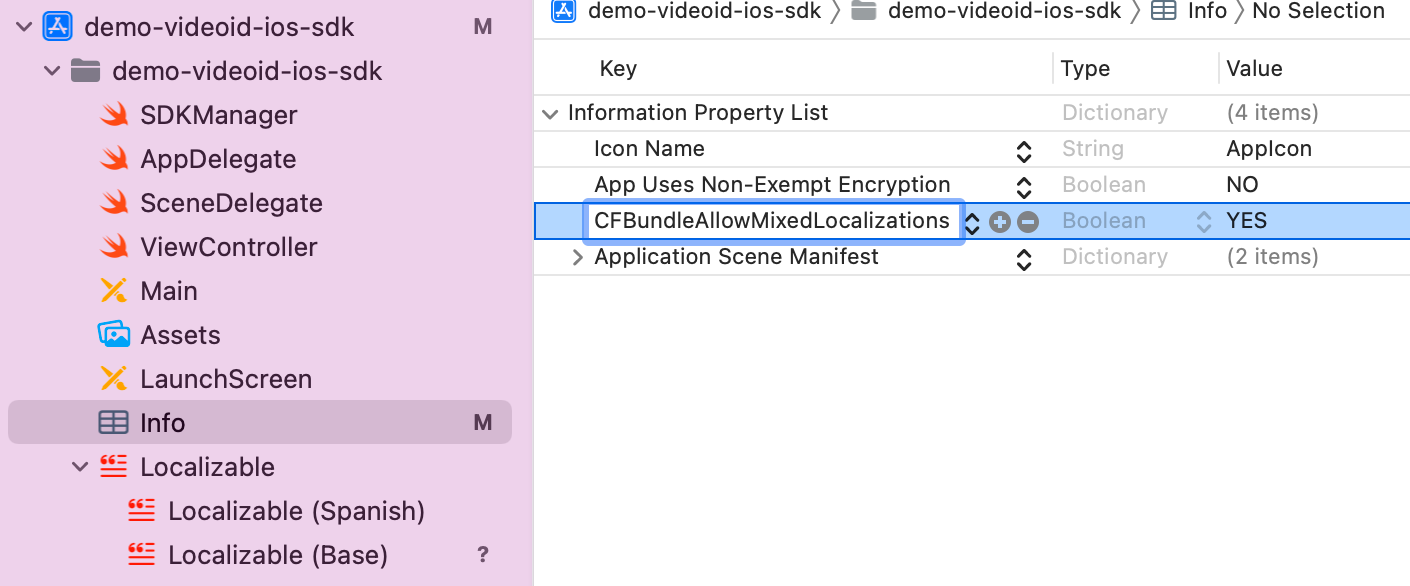
If the package is installed via SPM, for text localization to work, the following needs to be added to the Info.plist file of the integrator app:
CFBundleAllowMixedLocalizations = YES.
It would look like this:
-
English - Spain
-
Spanish - Spain
-
Portuguese - Portugal
The component's language can be configured with the locale parameter of the initSdk function. If not configured, by default, the SDK chooses the established lnaguage of the device.
-
If the language is any language whose root is Spanish (e.g. Spanish - Mexico), by default, it will use Spanish - Spain.
-
If the language is any language whose root is Portuguese (e.g. Portuguese - Brazil), by default, it will use Portuguese - Portugal.
-
For any other case, English will be used.
8.5.2 Customized Language Configuration
The component allows the customization of texts according to the language, which as in the previous case, will be defined by the language that is selected on the device.
This customization applies to new localizations as well as to the case of the default languages (es, en and pt-PT). It is done through the use of Localizable.strings. files.
8.5.3 Keys for multi-languages
The texts can be customized by overriding the value of these keys inside a Localizable.strings. The ones with an _alt suffix are the accesibility label's needed for the voice over functionality to work.
"nfc_component_start_message" = "\nSwipe the document\n until the device detects it";
"nfc_component_reading_face_message" = "Extracting face image.";
"nfc_component_reading_images_message" = "Extracting images.";
"nfc_component_reading_document_message" = "Extracting document data.";
"nfc_component_error_retrieving_document_data_message" = "An error happened while trying to retrieve the document's data";
"nfc_component_read_successful_title" = "NFC read successfully";
"nfc_component_error" = "The NFC could not be read";
"text_error_tag_connection_lost" = "Reading interrupted. Put the document back on the upper part.";
"text_error_tag_connection_lost_timer" = "There was a reading error. Please cancel to restart the process.";
"nfc_component_timeout_desc" = "You have exceeded the NFC read time. Please try again";
"text_chip_duplicated_session_error" = "Duplicated scan session, please try again after this message is dismissed";
"text_chip_security_serial_number_title" = "Serial number";
"text_chip_security_algorithm_sign_title" = "Signature algorithm";
"text_chip_security_algorithm_public_key_title" = "Public key algorithm";
"text_chip_security_certificated_impress_title" = "Printout of certificate";
"text_chip_security_editor_title" = "Editor";
"text_chip_security_subject_title" = "Subject";
"text_chip_security_valid_from_title" = "Valid from";
"text_chip_security_valid_still_title" = "Valid to";
"text_loading_optional_description" = "Reading, please don't move the document";
"icon_loading_filled_circle" = "🟢";
"icon_loading_void_circle" = "⚪️";
"nfc_component_end_confirmation_title" = "Finalize";
"nfc_component_end_confirmation_message" = "Are you sure you will finish the process?";
"nfc_component_cancel"="Cancel";
"nfc_component_agree" = "Accept";
"nfc_component_tutorial"="Put the document **in contact** with the back of your device.";
"nfc_component_tutorial_iphone_15"="Put the document **in contact** with the front of your device.";
"text_tutorial_nfc_title" = "NFC reading";
"text_tutorial_nfc_button_ok"= "START";
"text_tutorial_nfc_button_tip"= "FOLLOW THESE TIPS";
"nfc_component_tutorial_title"="Scan NFC";
"nfc_component_tutorial_button_disabled" = "PREPARING NFC";
"nfc_component_tutorial_1"="When we pass a card through a sensor, there is an exchange of information called NFC.";
"nfc_component_tutorial_2"="On your mobile, the sensor is in the marked area. Here you must gather your document.";
"nfc_component_tutorial_3"="For a better reading, remove the cover of your mobile.";
"nfc_component_tutorial_3_pass"="Keep **closed** the passport to do the reading.";
"nfc_component_next" = "NEXT";
"nfc_component_previous" = "PREVIOUS";
"nfc_component_more_info_finish" = "FINISH";
"diagnostic_tag_connection_lost_title" = "Reading not finished";
"diagnostic_tag_connection_lost_description" = "Hold the position until the end of the reading";
"diagnostic_invalid_mrz_error_title" = "There was a technical problem";
"diagnostic_invalid_mrz_error_description" = "We’re sorry. We need a new photo of the document";
Thus, if you want to modify for example the text "START" of the key text_tutorial_nfc_button_ok for the language en-EN, you must go to the file Localizable.strings in the folder en-EN.lproj if it exists (if not, you must create it) and there, add:
"text_tutorial_nfc_button_ok"="BEGIN";.
If a message is not specified in the language file, it will be filled with the default message.
9. Troubleshooting
9.1 OpenSSL contains bitcode
The specific error is shown when trying to upload an app that depends on nfcComponent with XCode 16.
Asset validation failed (90482) Invalid Executable. The executable 'Runner.app/Frameworks/OpenSSL.framework/OpenSSL' contains bitcode. (ID: 769a1928-0b74-4b3d-b58a-0cb36799d1df)
The error can be bypassed by pasting this script in the Podfile:
post_install do |installer|
  ### XCode 16 fix
  bitcode_strip_path = `xcrun --find bitcode_strip`.chop!
  def strip_bitcode_from_framework(bitcode_strip_path, framework_relative_path)
  framework_path = File.join(Dir.pwd, framework_relative_path)
  command = "#{bitcode_strip_path} #{framework_path} -r -o #{framework_path}"
  puts "Stripping bitcode: #{command}"
  system(command)
  end
  framework_paths = [
  "Pods/OpenSSL-Universal/Frameworks/OpenSSL.xcframework/ios-arm64_armv7/OpenSSL.framework/OpenSSL",
  "Pods/OpenSSL-Universal/Frameworks/OpenSSL.xcframework/ios-arm64_i386_x86_64-simulator/OpenSSL.framework/OpenSSL",
  "Pods/OpenSSL-Universal/Frameworks/OpenSSL.xcframework/ios-arm64_x86_64-maccatalyst/OpenSSL.framework/OpenSSL",
  "Pods/OpenSSL-Universal/Frameworks/OpenSSL.xcframework/macos-arm64_x86_64/OpenSSL.framework/OpenSSL",
  ]

  framework_paths.each do |framework_relative_path|
    strip_bitcode_from_framework(bitcode_strip_path, framework_relative_path)
  end
end
After pasting the script, make a pod install and then the error should be gone.